

Description
3asyR: Simplify Online Reading for Dyslexia
Overview
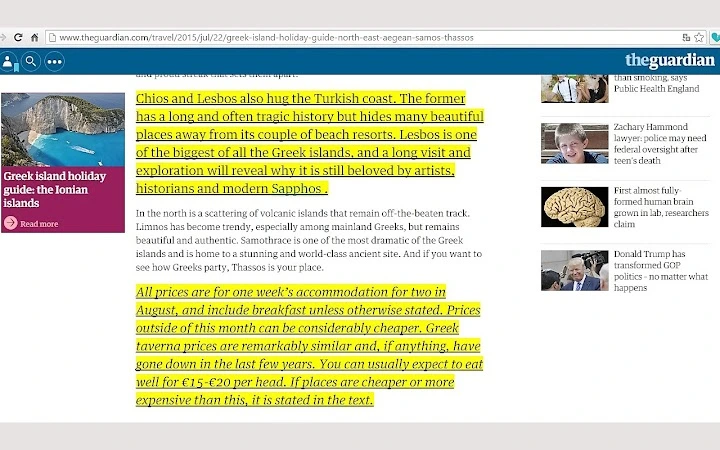
3asyR is an interactive browser-based tool designed to support individuals with dyslexia and other reading difficulties in navigating online content more effectively. The software enhances readability by offering customizable text formatting, including underlining, highlighting with 15 dyslexic-friendly colors, font selection, and adjustable font sizes ranging from 18 to 24. A built-in text-to-speech feature allows users to hear content aloud, promoting better comprehension and retention. The tool integrates directly into the browser, appearing as a logo in the address bar, enabling quick access with a single click. Once activated, users can apply real-time modifications to any webpage text, adjusting settings based on personal preference. This makes it ideal for students, professionals, and lifelong learners who rely on digital reading for education, work, or personal development. The developer did not provide additional details about the organization behind the tool, but its focus on accessibility suggests a mission-driven approach. Real-world usage includes reading academic articles, online news, e-books, or work documentation with improved clarity and reduced cognitive load.
Key Features & Capabilities
- One-Click Enable/Disable – Toggle 3asyR on any website with a single click, offering seamless control over when and where the tool is active.
- Text Underlining – Highlight sentences or paragraphs with a customizable underline style to improve visual tracking and focus.
- 15 Dyslexia-Friendly Highlight Colors – Choose from a palette of colors specifically selected to reduce visual stress and enhance text visibility for users with reading challenges.
- Custom Font Selection – Switch between different typefaces to find the one that provides the clearest and most comfortable reading experience.
- Adjustable Font Size (18–24) – Increase text size within a defined range to improve legibility and reduce eye strain.
- Text-to-Speech Functionality – Click a speaker icon over selected text to hear it read aloud, supporting auditory learning and comprehension.
- Word-by-Word Highlighting – Move the mouse to the right to highlight text incrementally, allowing users to follow along at their own pace.
- Save Custom Settings – Store preferred configurations for quick access across sessions, reducing setup time on future visits.
These features are particularly beneficial when reading dense online content such as research papers, lengthy web articles, or digital textbooks. The ability to customize visual and auditory input empowers users to tailor their reading experience to their specific needs. The real-time application of changes ensures minimal disruption to workflow. The developer did not specify whether settings sync across devices, but the tool appears to function locally within the browser environment.
User Interface, Workflow & Performance
The interface of 3asyR is minimal and integrated directly into the browser’s address bar, reducing visual clutter and maintaining focus on the content. The presence of a small logo indicates the tool’s status and serves as the primary access point. Clicking the logo opens a compact menu with all available options, allowing users to adjust settings without leaving the page. Navigation is intuitive, relying on familiar browser interaction patterns such as clicking and mouse movement. The workflow is streamlined: select a paragraph, apply desired formatting, and activate text-to-speech with a single click. The tool responds instantly to user input, suggesting efficient performance in real-time processing. However, exact performance details such as CPU or RAM usage were not specified. Stability appears to be consistent with typical browser extensions, though the developer did not provide information on crash rates or memory footprint. No external dependencies were mentioned, and the tool operates without requiring additional software installations.
Compatibility & System Requirements
3asyR is compatible with both Windows and Mac operating systems, making it accessible to a broad user base across desktop platforms. It functions as a browser extension, meaning it relies on the host browser’s environment for execution. The installation size is 2.5 MB, indicating a lightweight footprint that should not significantly impact system performance. The software version is 1.0, suggesting an initial public release with foundational features. The developer did not specify exact system requirements, such as minimum RAM, processor speed, or supported browser versions. Platform compatibility information is limited to the operating systems listed. Users should ensure their browser supports extensions and has JavaScript enabled to use 3asyR effectively. The tool does not require administrative privileges for installation, which simplifies deployment on shared or restricted machines.
Pros and Cons
Pros
- Free to use with no hidden costs
- Designed specifically for users with dyslexia and reading difficulties
- Lightweight at just 2.5 MB
- Real-time text customization without page reloads
- Intuitive browser-based interface with minimal learning curve
- Supports both visual and auditory reading assistance
- Offers 15 dyslexia-friendly highlight colors and adjustable font sizes
Cons
- Exact system requirements were not listed
- Limited to browser-based functionality; no standalone desktop application
- Developer background not disclosed
- No information on cross-device sync or cloud storage for settings
- Performance behavior under heavy browsing loads not documented
FAQ Section
Is 3asyR compatible with all web browsers?
3asyR is designed for desktop environments on Windows and Mac, but the developer did not specify which browsers are supported. Users should check the official source for confirmed browser compatibility.
Is 3asyR safe to use?
As a browser extension with a small file size of 2.5 MB, 3asyR operates within the browser’s sandboxed environment. No external data collection practices were disclosed, but it is recommended to review permissions before installation.
Does 3asyR require an internet connection?
Yes, since 3asyR functions as a browser extension, it requires an active internet connection to access and modify online content. It does not support offline reading or text processing.
Can I use 3asyR on multiple devices?
There is no information provided about device synchronization or cloud-based settings. Users may need to reconfigure preferences on each device if using different computers.
How often does 3asyR receive updates?
The developer has indicated that more updates are coming, but no specific release schedule was shared. Users are encouraged to monitor the official site for new features and improvements.
Final Thoughts
3asyR presents a focused, user-centric solution for individuals struggling with online reading due to dyslexia or similar challenges. Its combination of visual enhancements—underlining, color highlighting, font customization—and auditory support through text-to-speech offers a comprehensive approach to improving accessibility. The tool’s lightweight design, ease of use, and free availability make it an attractive option for students, educators, and professionals alike. While some technical details remain unspecified, the core functionality is robust and well-executed within its intended scope. For anyone seeking to enhance reading comprehension and reduce cognitive strain while browsing the web, 3asyR delivers tangible value. The developer’s commitment to ongoing improvements suggests a promising future for the tool.
Download 3asyR now
Guides & Tutorials for 3asyR Extension for Chrome
How to install 3asyR Extension for Chrome
- Click the Preview / Download button above.
- Once redirected, accept the terms and click Install.
- Wait for the 3asyR Extension for Chrome download to finish on your device.
How to use 3asyR Extension for Chrome
This software is primarily used for its core features described above. Open the app after installation to explore its capabilities.
User Reviews for 3asyR Extension for Chrome 0
No reviews found





